
At Rapidnet, we're dedicated to providing you with the latest technologies and features to enhance your internet experience. Let's delve into the world of IP addresses and the advancements we're offering.
Static IP Addresses and Port Forwarding
We're excited to announce that static IP addresses are now available by default with our services. This simplifies setup for home automation or surveillance systems, as well as any other applications that require a consistent IP address. Need help with port forwarding? Our team can assist you with basic setup, or you can manage it yourself if you prefer.
Introduction of IPv6
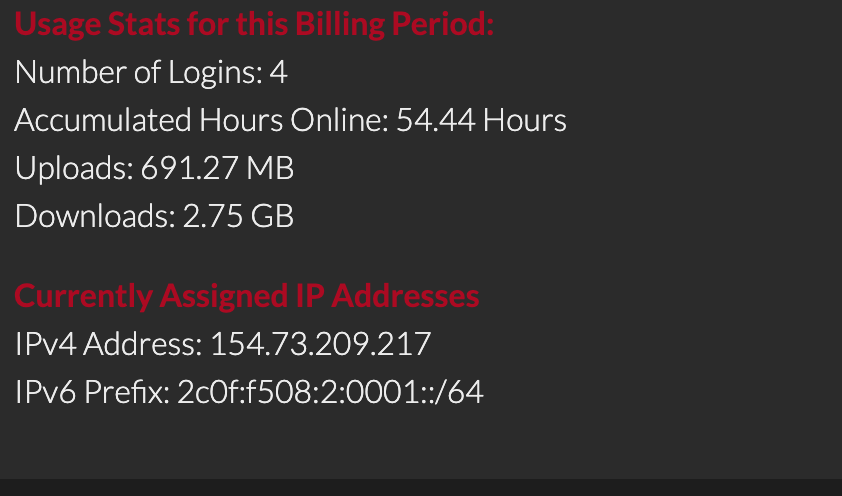
As we move forward, we're embracing IPv6 to address the limitations of IPv4 and ensure future compatibility. IPv6 addresses (e.g., 2001:0db8:85a3:0000:0000:8a2e:0370:7334) offer a vast pool of addresses compared to IPv4 (e.g., 154.73.208.92), which is crucial as IPv4 addresses become scarce. Your broadband session now includes both a static IPv4 address and an IPv6 /64 Prefix to future-proof your internet connection. Unlike IPv4 we won't just be assigning you a single addresses, but an entire /64 (about 18 Quintillion IP addresses) yes Quintillion thats 18 with 18 Zeros behind it! Don't worry all you need to know is that you will not have a storage of IPv6 IP addresses in your home.
Understanding the Differences
IPv4 and IPv6 addresses differ not only in appearance but also in their implications. While IPv6 offers numerous benefits, including a larger address space and built-in security features, it's essential to understand the security considerations. Devices in your home that support IPv6 will have public IPv6 addresses, emphasising the importance of implementing best security practices, especially with smart devices like IoT and surveillance cameras.
Best Security Practices
- Regularly update firmware: Keep your router and devices up to date with the latest security patches.
- Enable encryption: Use strong encryption methods like WPA3 for Wi-Fi networks to protect data transmission.
- Change default passwords: Replace default passwords with strong, unique passwords to prevent unauthorised access.
- Segment networks: Separate IoT devices from your main network to limit potential security risks.
- Disable unnecessary features: Turn off features and services you don't need to reduce the attack surface.
Accessing Your Information
If you're still on our older platforms, don't worry. You'll be migrated to the new system in the coming months. For those already on the new system, you can view your IP addresses, sessions, traffic graphs, and utilisation data by accessing the "Broadband Express" panel in My Rapidnet.
With these advancements and insights into IP addresses, Rapidnet is committed to providing you with a secure and future-ready internet experience. If you have any questions or need assistance, feel free to reach out to our support team.
